 Writers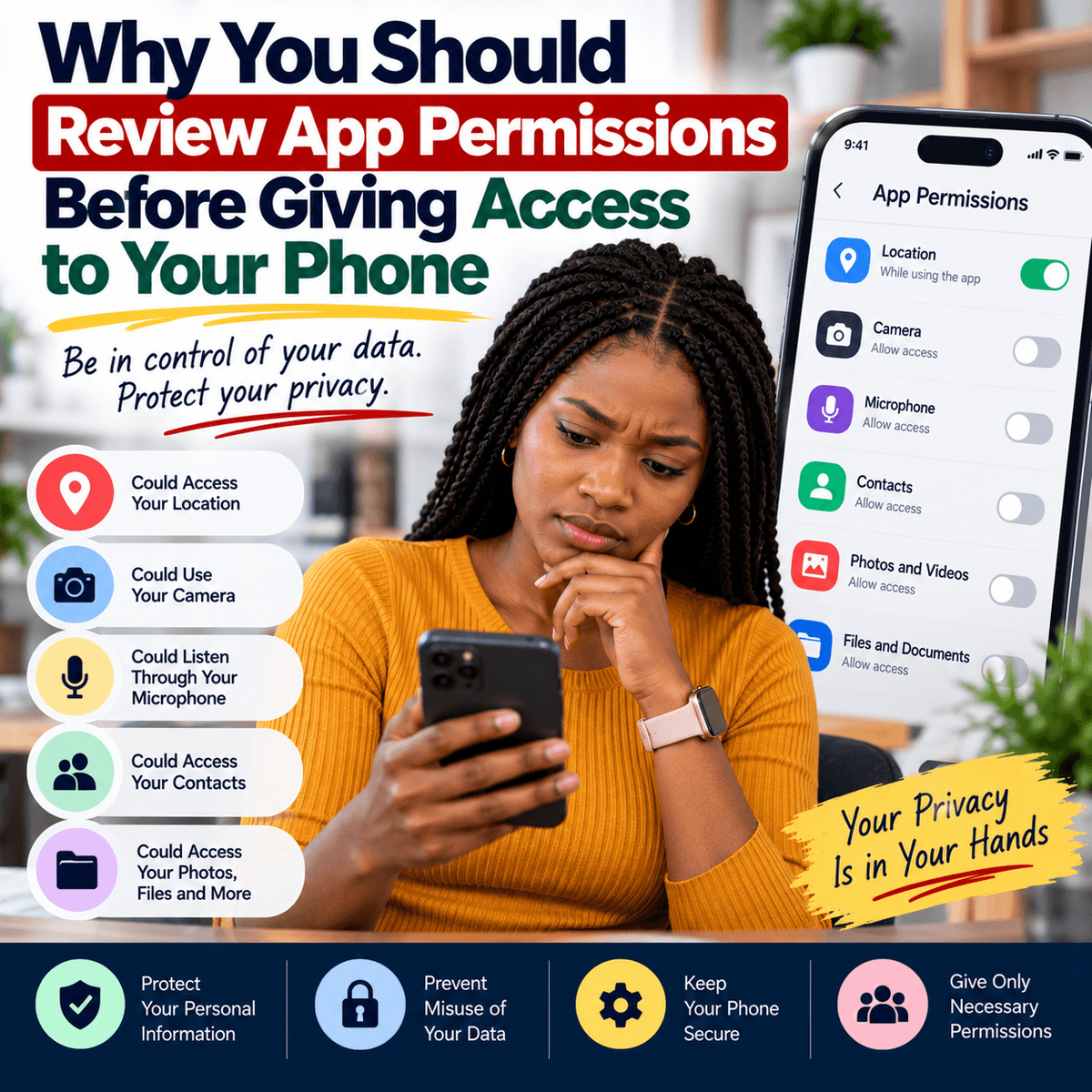
Installing a new app on your phone can take only a few seconds, but the permissions you give that app can affect your privacy long after the installation is complete. Apps often request access to different parts of your device so they can perform certain functions. A camera app may need access to your camera, a navigation app may need your location, and a messaging app may request access to your microphone when you want to make a voice or video call. These requests can be reasonable because the app needs certain information or features to work properly. The problem begins when people approve every permission without checking what they are allowing. An app may request access to your contacts, photos, microphone, camera, location, files or other information stored on your device. Before approving such a request, ask yourself whether the permission makes sense for what the app is supposed to do. If you download a simple calculator, for example, you may reasonably question why it wants access to your contacts or microphone. The request does not automatically prove that the app is harmful, because permissions can sometimes support features that are not immediately obvious. However, you should understand why access is needed before granting it. Your phone contains a large amount of personal information, including private conversations, photographs, documents and information about the services you use. Treating every permission request as something that must be accepted can give apps more access than you intended. Developing the habit of reading permission requests before tapping “Allow” is therefore a simple but important part of using technology responsibly.
One important permission to pay attention to is location access. Many apps have valid reasons for using your location. A navigation service needs to know where you are to provide directions, while a transport or delivery app may use your location to help drivers or riders find you. However, not every app needs continuous access to your location. Modern phones may provide choices such as allowing access only while you are using the app, allowing it once or refusing it completely. The exact options depend on your device and operating system. Where these choices are available, consider giving an app only the level of access required for the feature you want to use. Camera and microphone permissions deserve similar attention. Video-calling apps need them when you are making calls, and social media apps may need camera access when you want to take a picture directly within the app. But if an unfamiliar application requests access to your microphone when its main function does not appear to involve audio, it is reasonable to check why. Contacts are another sensitive area because your contact list contains information about other people as well as yourself. When an app asks to read your contacts, you may be sharing names, phone numbers or other saved details belonging to friends, relatives, colleagues and customers. Some apps use this access to help you find people you know, but you should decide whether that feature is worth granting access to your contact list. Rather than treating permissions as a simple choice between installing an app and refusing to use it, look for options that allow the app to work while limiting unnecessary access.
Photo and file permissions are also important because people now keep valuable information on their phones. Your gallery may contain family photographs, screenshots of conversations, receipts, identity documents, work information and other private material. An app that allows you to upload a profile picture may need access to a photograph, but that does not always mean it needs unlimited access to everything stored on your device. Some newer phone systems allow users to select particular photos instead of giving an app access to the entire photo library. When such an option is available and fits what you are trying to do, it can reduce unnecessary access. You should also pay attention to apps that ask for permission to send notifications. Notification access is different from access to your private files, but allowing every app to send constant alerts can make it easier to miss messages that actually matter. More importantly, some types of special permissions can give apps much greater control over a device. Depending on the operating system, an app may request permission to display over other apps, install software from outside the normal app store, change certain system settings or use accessibility features. Accessibility tools have important legitimate uses, especially for people who need help interacting with their devices, but powerful permissions should be given carefully. Avoid changing security settings simply because an unfamiliar app tells you that doing so is required. If an application asks you to disable a protection feature or grant unusual access without a clear reason, stop and investigate before continuing. Downloading apps from official stores can reduce some risks because applications generally go through platform checks, but it does not remove the need to pay attention to what an app requests after installation.
Reviewing permissions should not be something you do only when installing a new application. Apps can remain on a phone for years, and it is easy to forget what access you gave them when they were first installed. You may also stop using an app while it remains installed with permissions that are no longer necessary. From time to time, open the privacy or permission section of your phone's settings and review which applications can access sensitive features. The exact menu names differ between Android phones, iPhones and different software versions, but most modern smartphones provide a way to see which apps have access to areas such as the camera, microphone, location, photos and contacts. Look especially at apps you rarely use. If you cannot remember why an application is installed, consider whether you still need it. Removing unused apps can reduce clutter and may also reduce the number of services that have access to your information. For apps you want to keep, review whether each permission is still necessary. Removing a permission does not have to be permanent. If a feature later needs that access, the app can usually request it again. You should also keep your phone and apps updated because software updates can fix security problems and improve privacy controls. Before downloading an unfamiliar app, check the developer, read the description carefully and consider whether you really need the application. Be cautious about downloading modified or unofficial versions of popular apps from unknown websites, especially when they ask you to change security settings before installation.
Managing app permissions does not require you to become a technology expert or reject every request you see. The goal is to make informed choices about what you allow apps to access. A useful rule is to give an application the minimum access it reasonably needs to provide the function you want. If a map needs your location while you are navigating, that request makes sense. If you want to record a video within an app, camera and microphone access may be necessary. But when a permission seems unrelated to the service being provided, do not approve it automatically. Read the explanation if one is provided, check the app's settings and look at the developer's privacy information when necessary. If you are uncomfortable with the amount of information an app requires, consider whether another application can provide the same service with less access. Also remember that permissions are only one part of digital privacy. Strong and different passwords, extra sign-in protection, regular software updates and care when opening links or downloading files remain important. App permissions, however, are one area where you have direct control over what information and device features an application can use. Taking a few minutes to review them can help you reduce unnecessary access to your location, photos, contacts, camera and microphone. Your smartphone is more than a device for making calls; it stores a large part of your personal and professional life. You should therefore know which applications can access its most sensitive features. Before tapping “Allow,” read the request, consider whether it is necessary and choose the most limited access that still lets you use the feature you need.