 Writers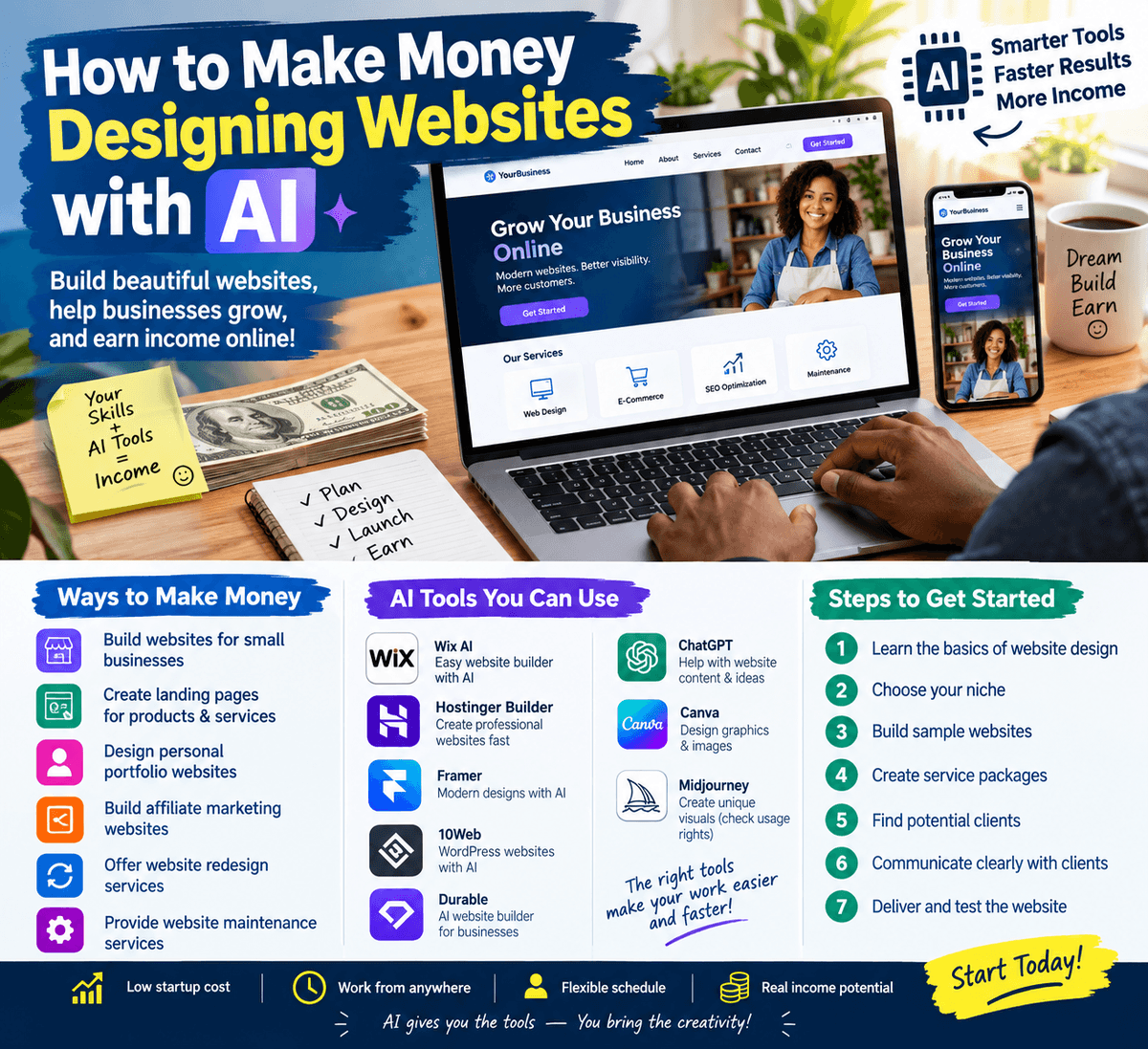
How to Make Money Designing Websites with AI
The internet has created countless opportunities for people to earn money online, and website design is one of the skills that can become a profitable digital service. In the past, designing a website often required advanced coding knowledge, expensive software, and many hours of work. Today, artificial intelligence (AI) tools are making website creation easier, allowing beginners to build attractive websites and offer services to businesses, individuals, and organizations.
If you know how to use AI tools creatively, you can turn website design into a freelance business or a source of additional income. You do not necessarily need to be an expert programmer to begin. However, you still need to understand basic design principles, communicate with clients, and make sure the websites you create actually work.
What Does AI Website Design Mean?
AI website design involves using artificial intelligence tools to help plan, create, design, write content for, and improve websites.
Some AI website builders can generate a website after you describe what you want. For example, you might type:
"Create a modern website for a small bakery with a homepage, menu section, customer testimonials, contact details, and an online order button."
The tool may generate a starting layout, text, images, and design suggestions. You can then customize the website to match the client's business.
AI does not eliminate the need for human creativity. Instead, it helps reduce the time spent on repetitive tasks and allows you to focus more on the client's needs.
How Can You Make Money Designing Websites with AI?
There are several ways to turn AI-assisted website design into an income-generating service.
1. Build Websites for Small Businesses
Many small businesses need websites but may not have the time or technical knowledge to create them. These businesses can include:
- Restaurants and food vendors
- Fashion designers
- Hair salons and barbers
- Photographers
- Real estate agents
- Fitness coaches
- Cleaning companies
- Event planners
- Tutors and training centers
- Local shops
You can offer to create a professional website that displays their services, business hours, contact information, location, and social media links.
For example, a restaurant may need a website where customers can view its menu and contact the business. You could design the website with AI assistance and charge a fee for the completed project.
2. Create Landing Pages for Businesses
A landing page is a focused webpage designed to promote a product, service, event, or offer.
Businesses use landing pages for purposes such as:
- Advertising a new product
- Collecting customer inquiries
- Promoting an online course
- Advertising an event
- Encouraging visitors to book a service
- Promoting a special discount
You can use AI to help create the layout, write persuasive but accurate text, and suggest calls to action. Because landing pages are often smaller than complete websites, they can be a good starting point for beginners.
3. Design Personal Portfolio Websites
Professionals and freelancers often need websites to showcase their work and attract clients.
You can create portfolio websites for:
- Graphic designers
- Writers
- Musicians
- Makeup artists
- Developers
- Photographers
- Virtual assistants
- Consultants
A portfolio website can include an introduction, services, examples of previous work, testimonials, and contact information.
You can offer a package that includes website design, content arrangement, and basic mobile optimization.
4. Build Websites for Affiliate Marketing
Affiliate marketers often need websites to publish articles, review products, and recommend services. You can create simple websites with pages such as:
- Home
- About
- Blog
- Contact
- Privacy Policy
You can also help organize product review pages and comparison content. However, affiliate websites should contain useful, honest information rather than misleading claims or copied content.
This service can be offered to people who want to start affiliate marketing but do not know how to build a website.
5. Offer Website Redesign Services
Some businesses already have websites, but their designs may look outdated, load slowly, or work poorly on mobile devices.
You can offer to improve:
- Website appearance
- Navigation
- Mobile responsiveness
- Page organization
- Readability
- Contact forms
- Calls to action
- Basic loading performance
AI can help suggest modern layouts, rewrite unclear text, and generate design ideas. You should still test the website yourself before delivering it.
6. Provide Website Maintenance Services
Website design can create one-time income, but maintenance can provide recurring income.
After building a website, you can offer services such as:
- Updating business information
- Adding new products or services
- Publishing blog posts
- Replacing images
- Updating menus
- Checking broken links
- Making small design changes
- Updating website content
For example, a client may pay you monthly to keep their website updated. Always agree clearly on what the maintenance package includes.
AI Tools You Can Use
Different tools can help with different parts of the website design process. The best choice depends on the type of website you want to create.
AI Website Builders
AI website builders can generate website layouts from written descriptions. Some provide visual editors that allow you to change colors, fonts, sections, and images without writing code.
Examples of tools to explore include:
- Wix AI
- Hostinger Website Builder
- Framer
- 10Web
- Durable
Check each platform's current features, pricing, hosting options, and commercial-use terms before choosing one for client work.
AI Writing Tools
AI writing assistants can help you draft:
- Homepage text
- Service descriptions
- About-us sections
- Blog outlines
- Product descriptions
- Frequently asked questions
You should review and edit AI-generated content to ensure it is accurate, original, and suitable for the client.
AI Image and Design Tools
AI image tools can help you create visual concepts, illustrations, banners, and design inspiration. However, you should confirm that any images used commercially are permitted under the tool's licensing terms.
For business websites, authentic client photos are often more useful than generic AI-generated images.
Step-by-Step: How to Start Your AI Website Design Business
Step 1: Learn the Basics of Website Design
Before charging clients, understand basic concepts such as:
- Homepage structure
- Navigation menus
- Typography
- Color combinations
- Mobile responsiveness
- Contact forms
- Website hosting
- Domain names
- User experience
You do not need to master everything immediately, but you should be able to create a website that visitors can use easily.
Step 2: Choose One Type of Website
Instead of trying to design every kind of website at once, choose a niche.
For example, you could focus on websites for restaurants, coaches, salons, or small online businesses.
Specializing can make it easier to create reusable templates and explain your service to potential clients.
Step 3: Build Sample Websites
Create two or three sample websites before looking for paying clients.
For example, you could build:
- A restaurant website
- A beauty salon website
- A personal portfolio website
These samples demonstrate your ability and give potential clients something to review.
If the websites are fictional examples, clearly identify them as sample projects rather than pretending they belong to real businesses.
Step 4: Create Service Packages
Make your services easy to understand. For example:
Basic Website Package
- One-page website
- Business information
- Contact button
- Mobile-friendly layout
Standard Website Package
- Several pages
- About section
- Services or product section
- Contact form
- Basic SEO setup
Maintenance Package
- Content updates
- Image replacement
- Small design changes
- Website checks
Your pricing should depend on the project's complexity, your experience, the platform used, and the client's requirements. Research your target market and avoid promising features you cannot deliver.
Step 5: Find Potential Clients
You can find clients through several channels:
- Freelance marketplaces
- Business networking groups
- Social media
- Local business directories
- Personal referrals
- Direct outreach to businesses
When contacting a business, avoid sending generic messages to everyone. Study the business first and explain how a website could help it.
For example, if a business has no website, you could mention that a website may make it easier for customers to find its services, view its information, and contact the business.
Step 6: Communicate Clearly with Clients
Before starting, ask the client questions such as:
- What is the purpose of the website?
- Who is the target audience?
- What pages are needed?
- Does the client already have a domain name?
- Does the client have a logo and business photos?
- What features are required?
- Who will provide the website content?
- What is the deadline?
- Who will pay for hosting and other services?
Clear communication helps prevent misunderstandings.
Step 7: Deliver and Test the Website
Before handing over the website, check that:
- The pages open correctly
- Buttons work
- Contact information is accurate
- Forms function properly
- Text is readable
- The website works on mobile devices
- Images are displayed correctly
- Links lead to the right destinations
- The client has access to the necessary accounts
Never assume that an AI-generated website is automatically perfect. Testing is an important part of professional website design.
How Much Money Can You Make?
The amount you can earn depends on your skills, location, target market, project complexity, and ability to find clients.
A beginner may start with smaller projects while building experience. More experienced designers may charge higher fees for advanced websites, e-commerce features, integrations, and ongoing support.
For example, if you complete two small website projects in a month, your earnings will depend on the price agreed for each project. You may also earn additional income from maintenance services, content updates, or other digital services.
Do not focus only on charging for the website itself. Consider the time required for planning, revisions, communication, testing, and delivery when setting your prices.
Important Mistakes to Avoid
Do Not Copy Other People's Websites
Use existing websites for inspiration, but do not copy their designs, text, images, or branding without permission.
Do Not Promise Features You Cannot Build
If a client requests online payments, booking systems, customer accounts, or complex integrations, make sure you understand how to implement and test those features.
Do Not Ignore Mobile Users
Many people browse websites on smartphones. A website that looks good only on a computer may provide a poor experience for visitors.
Do Not Depend Completely on AI
AI can make mistakes, generate inaccurate information, or create designs that do not meet the client's needs. Always review the output.
Do Not Forget Website Ownership
Before beginning a project, agree on who owns the domain, hosting account, website files, and paid subscriptions. This can prevent disputes later.
Final Thoughts
Designing websites with AI can be a practical way to develop a digital service business. AI tools can help you work faster, generate ideas, and create professional-looking starting points. However, earning money requires more than simply pressing a button. You need to understand website design, solve real problems, communicate with clients, and deliver reliable results.
Start by learning the basics, create sample websites, choose a specific service, and gradually build your portfolio. With consistent practice and good customer service, AI-assisted website design can become a useful freelance skill and a potential source of online income.