 Writers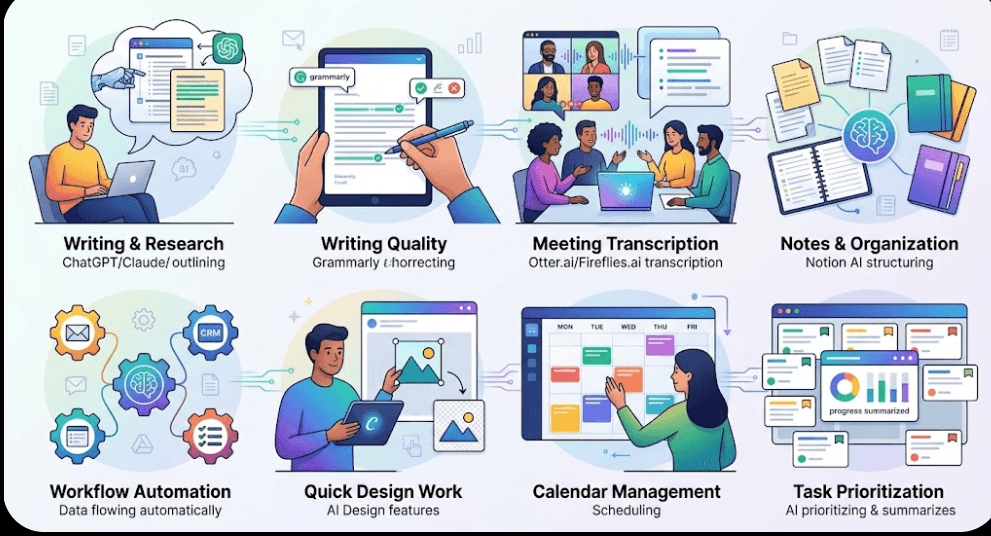
Most people don't need more hours in the day. They need to stop losing the ones they have to repetitive, low-value tasks: drafting the same kind of email, scheduling around conflicting calendars, transcribing meeting notes, or hunting for the right words to start a blog post.
That's the real problem AI tools solve. Not "replacing work," but removing the friction between having something to do and actually getting it done. Below are eight tools that consistently earn their place in a busy professional's toolkit — organized by the kind of time they give back.
1. ChatGPT or Claude for Writing and Research
Large language model assistants like ChatGPT and Claude have become the default starting point for drafting emails, outlining reports, summarizing long documents, and brainstorming ideas. Instead of staring at a blank page, you describe what you need and refine from there.
Practical example: Rather than spending 30 minutes drafting a client proposal from scratch, you can generate a structured first draft in minutes, then spend your time polishing the parts that actually require judgment.
2. Grammarly for Writing Quality
Grammarly checks grammar, tone, and clarity as you write, across email, documents, and browser-based apps. It's less about generating content and more about catching mistakes and awkward phrasing before anyone else sees them.
Practical example: For non-native English speakers or anyone sending frequent client-facing emails, it cuts down the back-and-forth of proofreading and reduces embarrassing typos in high-stakes messages.
3. Otter.ai or Fireflies.ai for Meeting Transcription
Both tools join video calls, transcribe conversations in real time, and generate searchable notes and summaries afterward. Instead of scrambling to write down what was said, you can stay present in the conversation.
Practical example: After a client call, you get an automatic summary with action items, so nobody has to reconstruct decisions from memory a week later.
4. Notion AI for Notes and Project Organization
Notion AI is built into the popular workspace app and helps summarize pages, draft content, and organize scattered notes into structured documents. For teams already using Notion for project management, it removes the extra step of copying information between tools.
Practical example: Turning a messy brainstorm doc into a clean project brief, or condensing a long thread of meeting notes into a short status update.
5. Zapier for Workflow Automation
Zapier connects different apps so that routine, multi-step tasks happen automatically. When something happens in one tool — a new form submission, a new email, a new calendar event — Zapier can trigger an action in another, without you touching either one.
Practical example: A new lead fills out a website form, and Zapier automatically adds them to your CRM, sends a welcome email, and notifies your sales channel — no manual data entry required.
6. Canva's AI Features for Quick Design Work
Canva's built-in AI tools, including Magic Design and background removal, help non-designers produce presentable graphics quickly. You don't need design training to create a professional-looking social post, presentation slide, or flyer.
Practical example: Turning a rough idea into a polished social media graphic in minutes rather than commissioning a designer or wrestling with more complex software.
7. Motion or Reclaim.ai for Calendar Management
These scheduling tools automatically block time for tasks, adjust your calendar when priorities shift, and protect focus time from being eaten by back-to-back meetings. They function less like a passive calendar and more like an assistant actively managing your day.
Practical example: Instead of manually rearranging your schedule every time a meeting runs long, the tool reshuffles your remaining tasks and calendar blocks automatically.
8. Asana's AI Features for Task Prioritization
Asana has added AI capabilities on top of its established project management platform, including generated progress summaries and suggested task priorities based on project data. This is especially useful for teams juggling multiple workstreams at once.
Practical example: Instead of manually compiling a weekly status report for stakeholders, Asana can generate a draft summary based on completed and upcoming tasks.
How to Actually Save Time With These Tools
Adding a tool to your routine doesn't automatically save time — it only helps if it fits into how you already work. A few practical guidelines:
Start with your biggest time drain. If meetings eat your week, start with a transcription tool. If it's scheduling chaos, start with a calendar assistant.
Don't stack too many tools at once. Learning curves add up. Introduce one or two, get comfortable, then expand.
Keep a human check on AI output. These tools are excellent first drafts and time-savers, not final authorities — especially for anything client-facing or high-stakes.
You don't need to overhaul your entire workflow to benefit from AI. Most of these tools solve one specific, recurring annoyance: too much writing, too many notes, too much manual scheduling, too much repetitive admin work.
Pick the tool that addresses your biggest bottleneck first. Once that becomes routine, layer in another. The goal isn't to use every AI tool available — it's to spend less time on the tasks that drain you and more time on the work that actually matters.